
New feature
Attach browser network recordings (HAR files) to Helpdesk tickets
Show support exactly which requests failed, without sharing your sign-in details.
- Stage
- Live
- Product
- Monta Hub
- Posted
What's new
Your teams can now attach a HAR file, the network recording a browser saves from its developer tools, to a Helpdesk ticket. It works from the reply box, from a file question on a ticket form, for external participants, and in emails sent to Helpdesk.
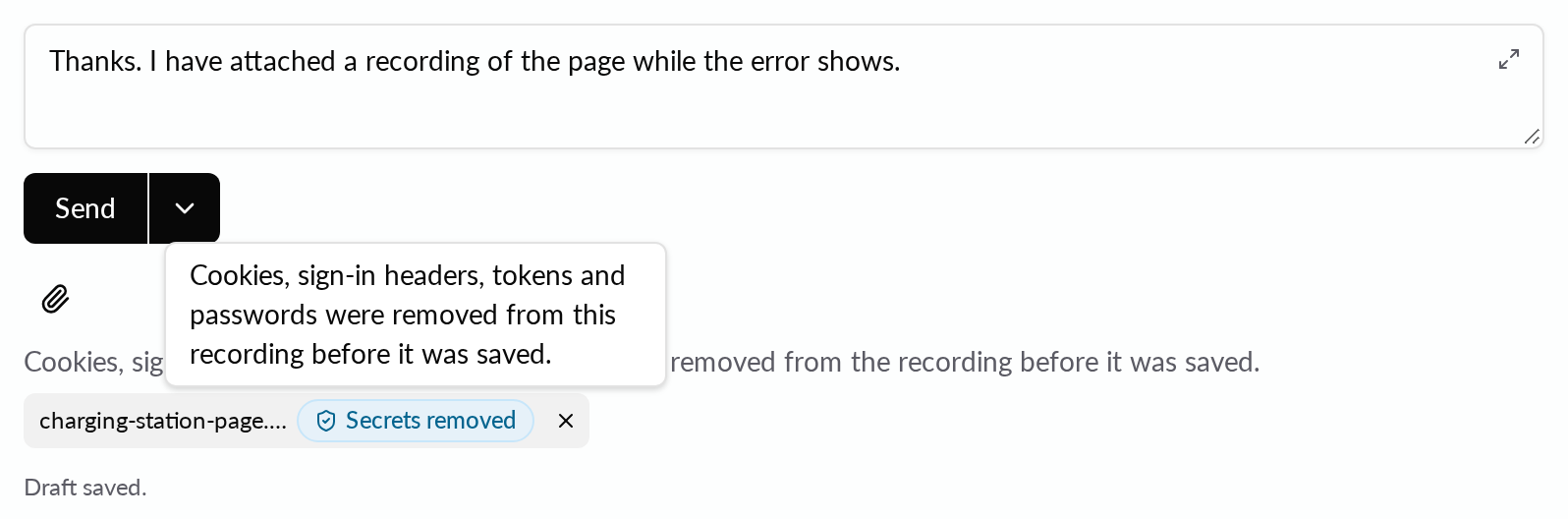
Before the file is saved, Helpdesk removes its cookies, sign-in headers, tokens and passwords. Only the cleaned copy is kept, and the file shows a "Secrets removed" label wherever it appears, with a tooltip that explains what was removed.
Why it matters
A recording shows support every request the page made and which ones failed, so a bug can be found without a long back and forth. Because sign-in details are removed first, sharing one does not hand over access to your account.
How to use it
- Record the steps that fail in your browser's developer tools and save the recording as a .har file.
- Attach the file to your Helpdesk ticket or reply, as you would any other file.
- Check for the "Secrets removed" note under the reply box once it is attached.
Files are limited to 10 MB, so record only the steps that fail. A .har file that is not a readable recording is refused with a message, since its secrets could not be removed.