
Improvement
Live charging sessions now show when their EVSE faults
See a session that has probably stopped delivering energy, in the Hub and through the Partner API.
- Stage
- Live
- Products
- Monta Hub, Operator API
- Posted
What changed
Until now, when an EVSE reported Faulted or Unavailable during a session, the session kept showing as charging. The fault only showed on the EVSE itself.
Now, while the EVSE of a live charging session reports Faulted, the session's page in the Hub shows a red "EVSE faulted" badge next to the session's state, in place of the "Live" badge, and the bar at the top of the page turns red. While the EVSE reports Unavailable, the badge reads "EVSE unavailable" and both are amber. A line under the EVSE name says since when, that the session is probably not delivering energy, the error code and vendor code if the EVSE reported them, and links to the EVSE. The page checks the EVSE every 30 seconds, so the fault appears and clears without a reload. The badge and the line disappear once the EVSE recovers.
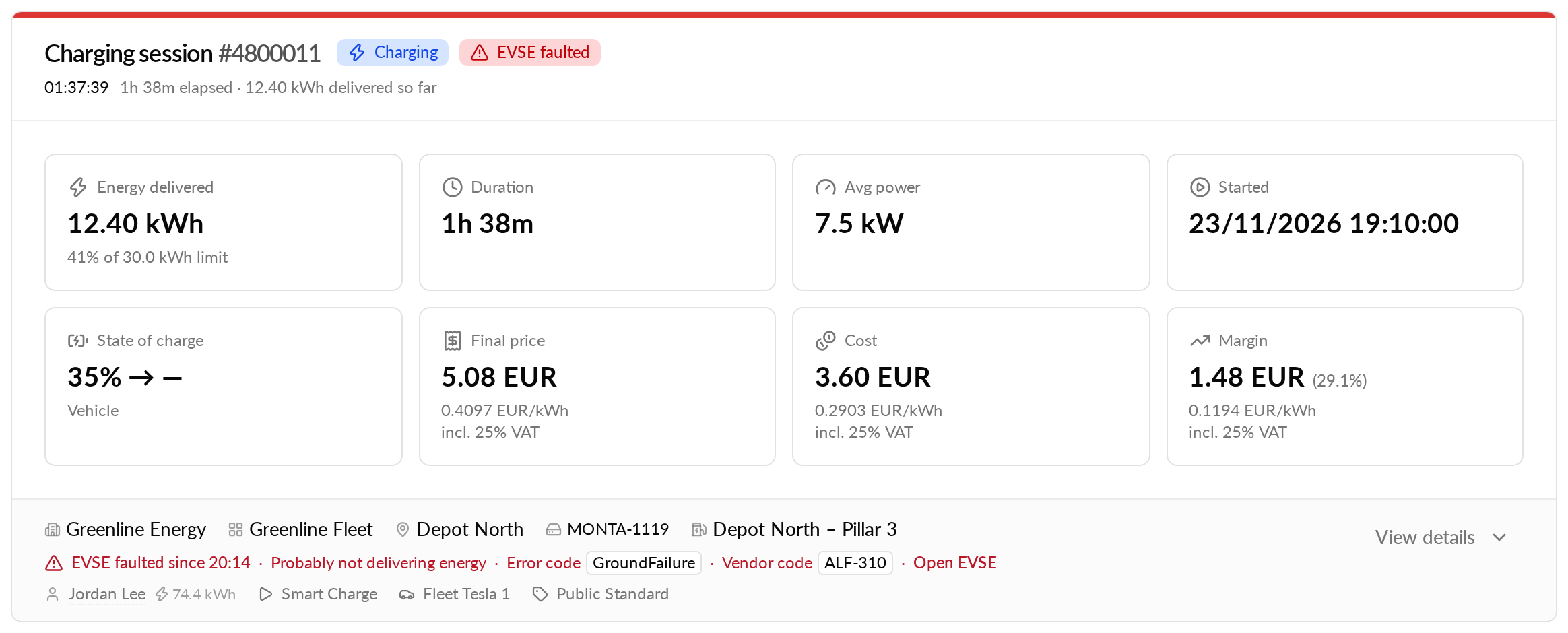
In the Partner API, an active charge now carries the OCPP status of its EVSE, with the error code, vendor error code and other details the EVSE reported: the same details you already read on the EVSE. You see it on charges at EVSEs your operator runs. A charges webhook is also sent when the EVSE moves into or out of Faulted or Unavailable during an active charge.
Your existing setup changes automatically: there is nothing to switch on. The session's own state stays as it was, so a session can still read Charging while its EVSE is faulted. If you receive charges webhooks, expect one more each time an EVSE faults or recovers during a session.
It applies to EVSEs that report their status over OCPP. An EVSE that is only offline does not count. Finished sessions, and sessions on other networks' EVSEs, show nothing new. In the Hub, roaming sessions show nothing new either, including a driver from another network charging on your EVSE. The Partner API does show the status for those sessions.
Why it matters
A session that looks like it is charging while its EVSE has faulted can leave a vehicle without the energy it needs, such as a truck that has to leave a depot on time. Your staff and your integrations now see the fault on the session itself and can act on it straight away, instead of matching EVSE status updates to sessions on their own.
Who it's relevant for
Operators who watch live sessions in the Hub, and integrations that follow sessions through the Partner API or the charges webhook, such as fleet and depot charging.
Where to find it
In the Hub, open a live session from Charging sessions under Operations. The Charging sessions list itself shows no badge.