
New feature
Vote on feature requests in Monta Hub
- Stage
- Live
- Released
- Product
- Monta Hub
What's New
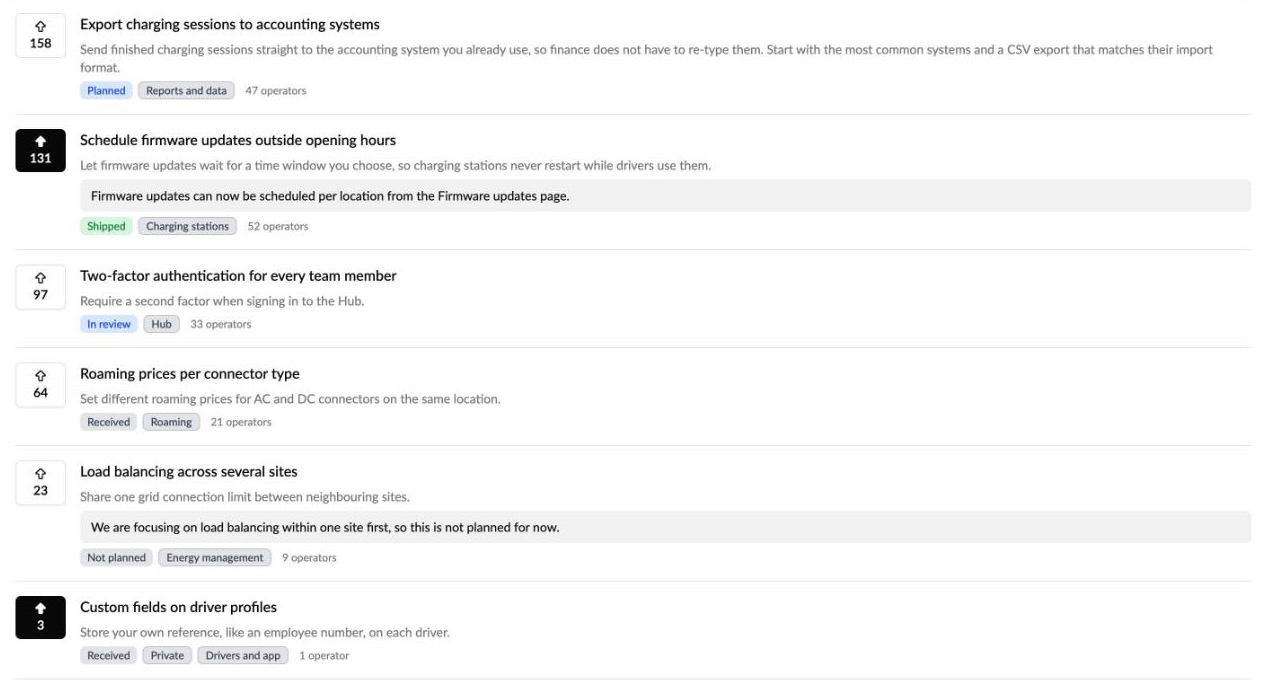
See what other operators have asked Monta for, and vote for the features that matter to you. A new Feature requests board sits next to the Roadmap under What's New in Monta Hub.
Send a request from the Helpdesk: tell Monta why you need it, what you need and by when.
Monta reviews every request: it's added to an existing request or becomes a new one, rewritten so it reads clearly for every customer.
Vote on the board: requests that apply to many customers are published on the board, ranked by how many people back them. Vote for the ones you need.
Follow and get updates: each request has its own page with the full description, updates from Monta and how many operators back it. Followers hear when Monta posts an update and when a request ships.
Why It Matters
Until now, a feature request was a ticket only you could see, and there was no way to tell whether others needed the same thing. The board turns one-off asks into shared requests: you can add your voice to what's already there, and Monta sees how many customers need each one when planning the roadmap.
How to Use
Browse and vote: in Monta Hub, go to What's New → Feature requests and select the vote button on a request.
Send a new request: select Helpdesk → New → Feature request, and fill in Summary, Why, What and When.
Follow a request: open it and select Follow. Voting follows it automatically.
Additional Info
Only requests written by Monta appear on the board. Your own ticket text is never shown to other operators, and other operators' names are never shown.
Voting tells Monta how many customers need a feature. It doesn't guarantee when or whether it ships.