
New feature
Lower the charge limit automatically when a location is busy
- Stage
- Early access
- Available to all customers
- To be confirmed
- Product
- Monta Hub
- Posted
What's new
You can now lower the charge limit on DC charge points automatically while a location is busy, so fast charge points free up faster for the next driver. Add rules to a location, such as while at least 75% busy, limit charges to 90% and while at least 90% busy, limit charges to 80%. When the location quiets down, the limit is removed again.
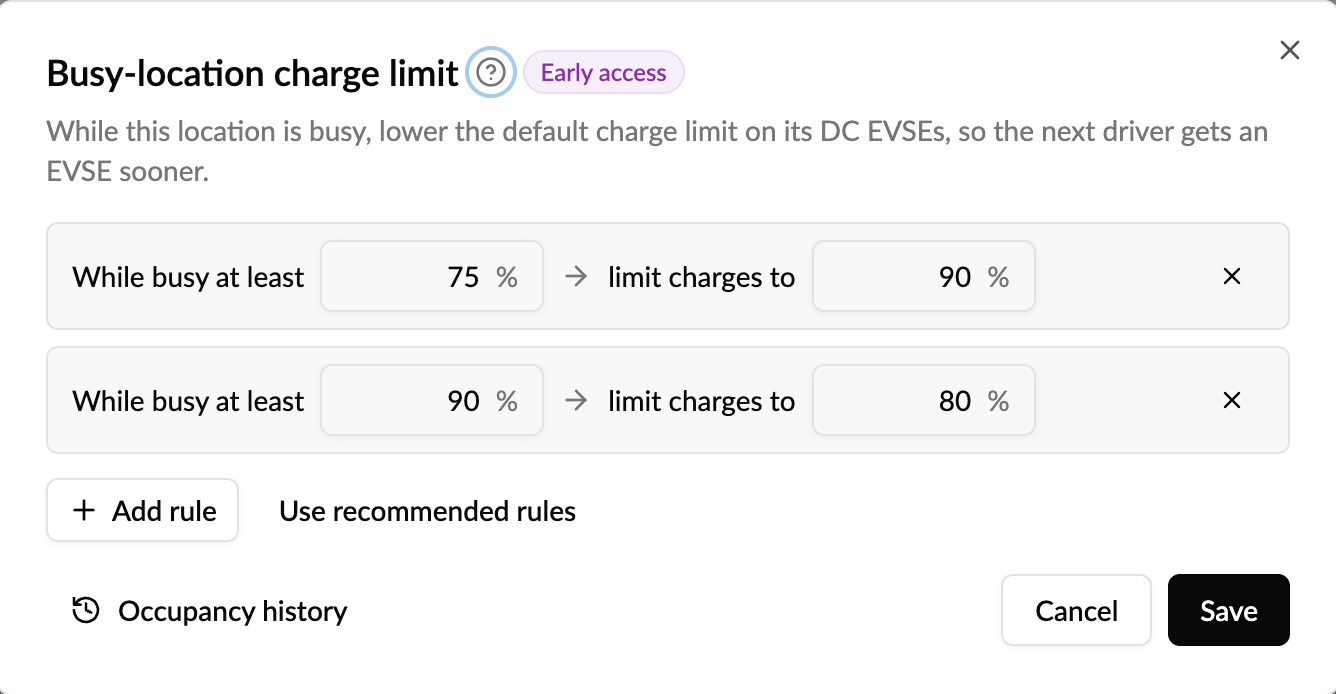
Monta measures how busy the location's DC charge points were over the last hour. Occupancy history shows every measurement and which limit applied, and each DC charge point shows why its default charge limit is locked.
Why it matters
Above about 80%, most cars charge much more slowly. At a full location, those last minutes block a fast charge point while other drivers wait. Lowering the limit only at peak times turns charge points over faster without capping charging the rest of the day.
Who it's relevant for
Operators with busy public DC locations, such as highway and retail fast-charging hubs.
How to use it
-
Open a location and go to Settings → Configuration → Busy-location charge limit.
-
Add your rules, or select Use recommended rules, then save.
-
Check Occupancy history to see how busy the location was and adjust the rules.
It applies to DC charge points only, at locations with at least two DC charge points. Only charges that start while a rule applies are affected, and drivers who set their own charge limit keep it.
Availability
Available now in early access. Read more in the help centre.
Where to find it
Hub → Location → Settings → Configuration → Busy-location charge limit.