
All updates
See where each of your sites sits in its local market
- Stage
- Live
- Released
- Product
- Monta Hub
- Posted
Today, setting tariffs means opening other charging apps one by one, picking a price by feel, then updating each price group by hand. It’s slow, it’s a guess, and you only catch the misfire when utilization or revenue drifts.
Pricing benchmarks changes that:
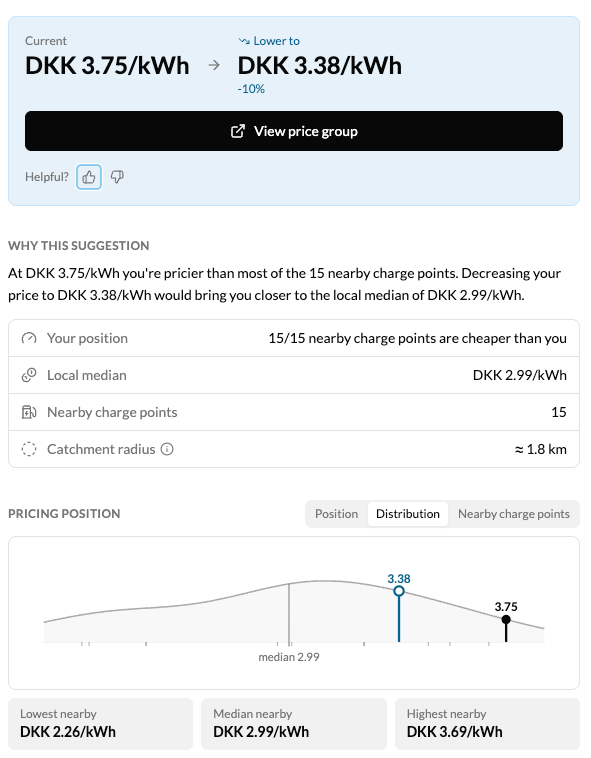
- See whether your site is an outlier in the given area - plotted against the median of nearby charge points, with a cohort radius that tightens in cities and widens in rural areas so the comparison stays locally relevant.
- Get a directional call for every site - Raise, Hold, or Lower with a target price capped at ±10%. Small enough to trust, big enough to matter.
- Work the outliers first - summary chips count your Raise / Hold / Lower sites and filter the table with one click.
- A market shift won’t surprise you next month - the view refreshes daily and the snapshot date is on the page, so drift shows up while you can still react.
Where to find it: Hub → Analytics → Pricing benchmarks (hub.monta.app/pricing-benchmarks). Operator-admin permission required. Available at launch in the Nordics, DACH, BENELUX, and France.
What’s next: utilization-weighted neighbours and bulk actions on recommendations are in development.