
Improvement
Ready-made reports in Data exports, and new layouts to try
Export net revenue, charging sessions or wallet transactions in one click, and help us choose the next Data exports layout.
- Stage
- Live
- Product
- Monta Hub
- Posted
What's new
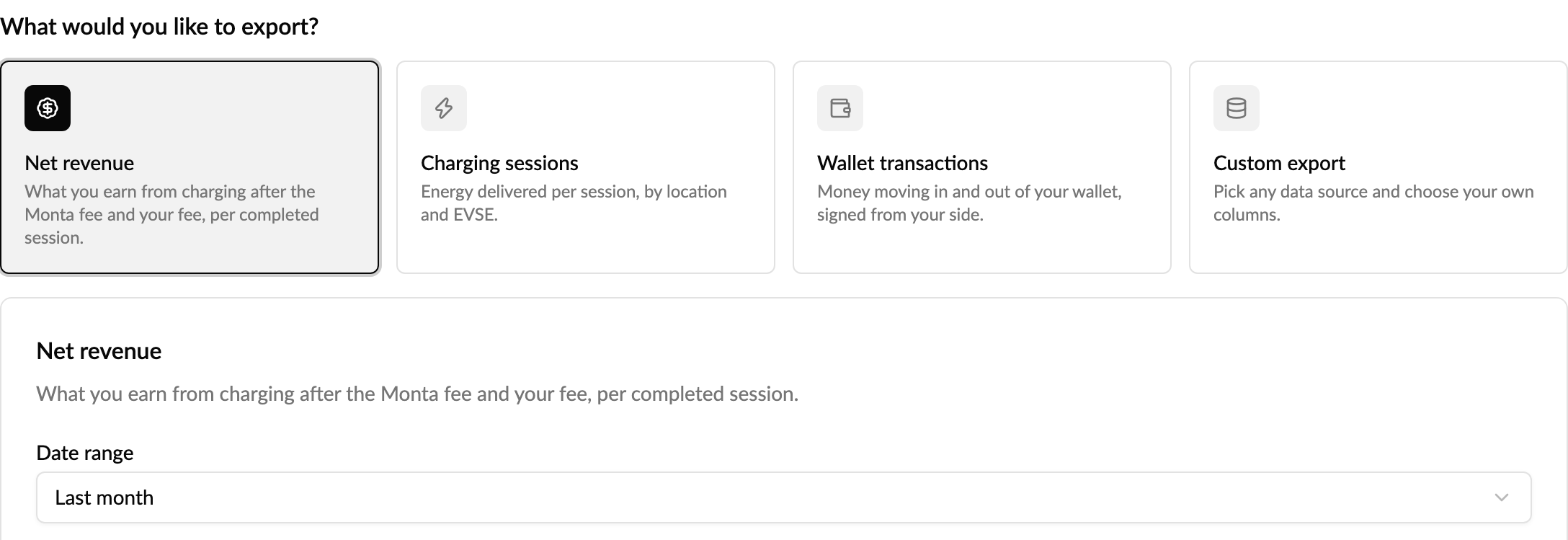
Data exports can now start from the question you want answered instead of the table it lives in. Pick a ready-made report and the right data source, columns and filters are set up for you, defaulting to last month:
- Net revenue: what each completed charging session earned you after the Monta fee and your own fee, including and excluding VAT.
- Charging sessions: the energy delivered in each session, with its location and EVSE.
- Wallet transactions: money moving in and out of your wallet, shown from your side.
Change the period with one click (last month, this month, last 30 days or all time), preview the rows, then download. Custom export is still there when you want to choose your own source and columns.
Help us pick the layout
We are trying three new ways to lay out the page and would like your view before we settle on one. Use Layout in the top right of Data exports to switch between Cards, Split workspace and Preview first, which updates the preview as you change anything. The page you know stays the default, and your report, filters and preview carry over when you switch.

Tell us what works with Give feedback on this layout, in the same menu or on the banner. It opens a short feedback ticket in Helpdesk, so it reaches the team building the page. Once we have chosen, the other layouts will be retired.
Why it matters
Finding your net revenue used to mean knowing which table holds it and which columns to tick. Ready-made reports take you straight to the numbers most operators ask for, and your feedback decides how the page looks from here.
Who it's relevant for
Operators who export charging, revenue or wallet data for finance, reconciliation or reporting.