
New feature
Choose which roaming networks your drivers can pay to charge at
Block named roaming operators, or allow only the ones you list, for every account an account template applies to.
- Stage
- Early access
- Available to all customers
- To be confirmed
- Product
- Monta Hub
- Posted
What's new
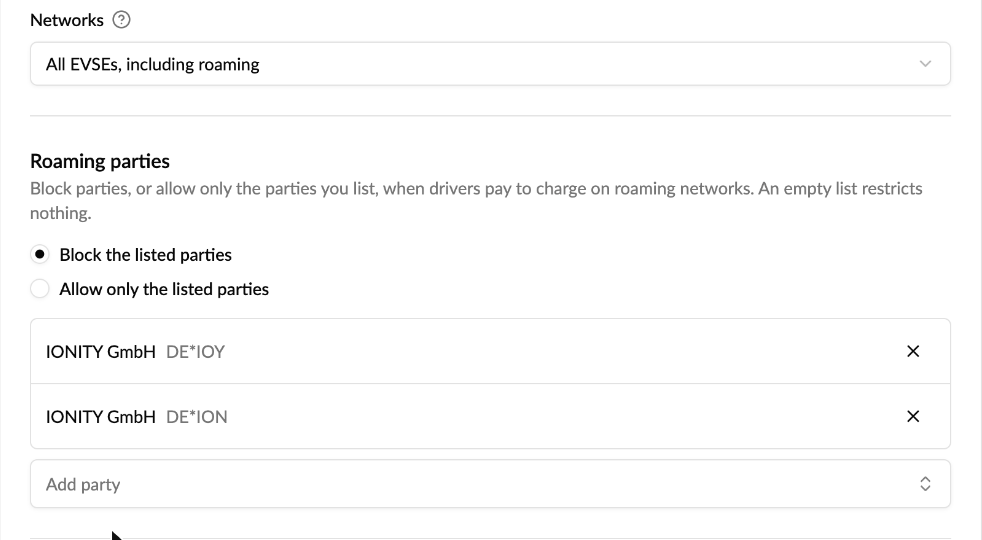
Account templates now have a Roaming parties list on the Wallet & restrictions step. Pick one of two modes:
- Block the listed parties: drivers on these accounts can't pay to charge at the operators you list.
- Allow only the listed parties: drivers can only pay to charge at the operators you list when they roam.
Add parties from a searchable list of roaming charge point operators. One entry covers that operator on every roaming hub, so you don't have to add it twice.
How to use it
Go to Admin → Operator → Account settings, open a template on the Templates tab and go to the Wallet & restrictions step. Under Roaming parties, pick block or allow, add the parties and save. The list applies to every account that uses the template. Read more in How do I control where my members can charge?
Good to know
- It covers paying with the account, through the account wallet and the account's charge keys. Drivers paying with their own card aren't restricted.
- An empty list restricts nothing, in either mode.
- Changes apply within about a minute, without re-applying the template. Running sessions aren't stopped.
- You can list roaming partners and Monta operators with their own operator ID, including Monta itself. Your own network (your operator, your parent and your sub-operators) is never restricted, and neither are operators that share Monta's or a parent's ID.
- It works on top of your other restrictions, such as countries and networks, so the strictest one wins.
- When you reopen a saved template, listed parties show by their ID (for example
DE*ION) rather than their name.
Who it's relevant for
Operators running fleet or company accounts who want to keep drivers away from specific roaming networks, for example because of price or contract terms.
This is in early access. Ask your Monta contact to turn it on for your operator.