
Improvement
Use your operator's reimbursement rates across all its accounts
Pick a reimbursement price group from your operator or parent operator when setting up an account's reimbursement, instead of copying the same rate into every account.
- Stage
- Live
- Product
- Monta Hub
- Posted
What's new
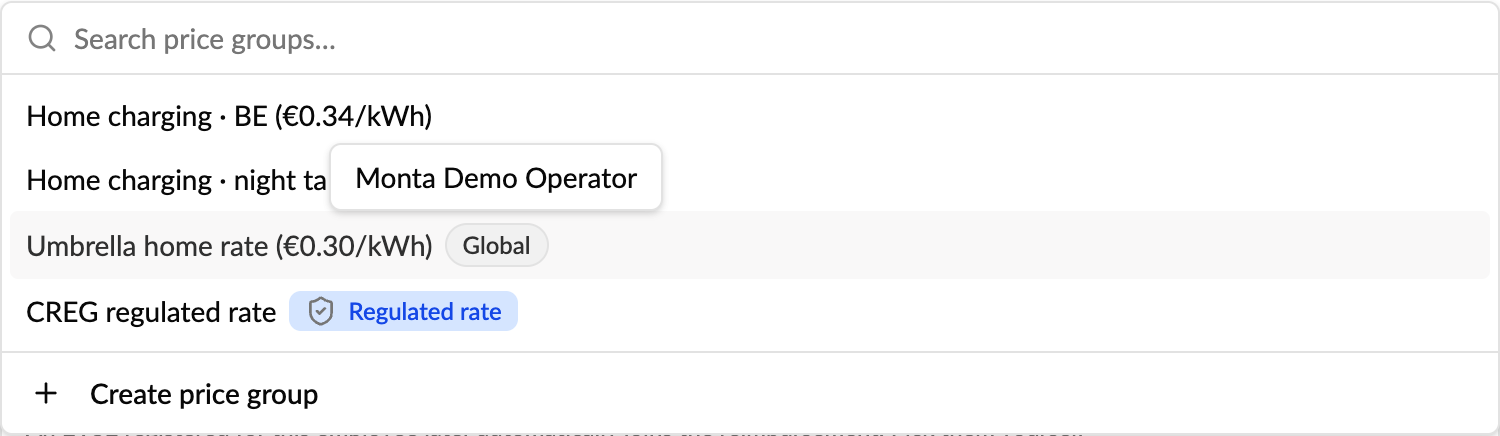
When you set up home charging reimbursement for an account in Monta Hub, you can now pick a reimbursement price group that belongs to your operator or to your parent operator, not only one the account owns. Set one rate once and use it across all the accounts under you, instead of copying the same price group into every account.
These shared price groups show with a Global badge in the picker, with the owning operator's name on hover.
How to use it
- Open the account and start Invite employee for reimbursement, or open an employee or a member group's reimbursement settings.
- Open the price group picker. The account's own price groups come first, then your operator's and parent operator's groups marked Global.
- Pick the group and save.
Currency check
A reimbursement rate is paid in the charger's currency, so a price group in another currency would pay the wrong amount. The EVSE picker now shows each EVSE's currency, and an EVSE in a different currency than the chosen price group can't be selected. A line under the list explains why.
Good to know
- Only operator staff see shared price groups. The accounts under one operator are different customers, and operator price groups are often named after a customer, so an account's own admin only sees the account's price groups. If operator staff set a shared group on an employee, the account admin still sees it on the employee page.
- Price groups of sister operators are never offered.
- Existing reimbursements aren't changed.
Who it's relevant for
Operators with many employer accounts or sub-operators that reimburse home charging at the same rate, for example white-label and umbrella operators.